Now in pre-release. Grab the GitHub repo and the one-line installer below.
Run a herd of real coding agentsship only what survives review.
Self-hosted mission control for interactive AI coding CLIs — spawn, watch, and steer a herd of real claude sessions (with the Codex CLI in alpha) from your browser or phone, with best-practice guardrails built in. On your own server, on your own subscription.
$ curl -fsSL https://shepherd.run/install.sh | bash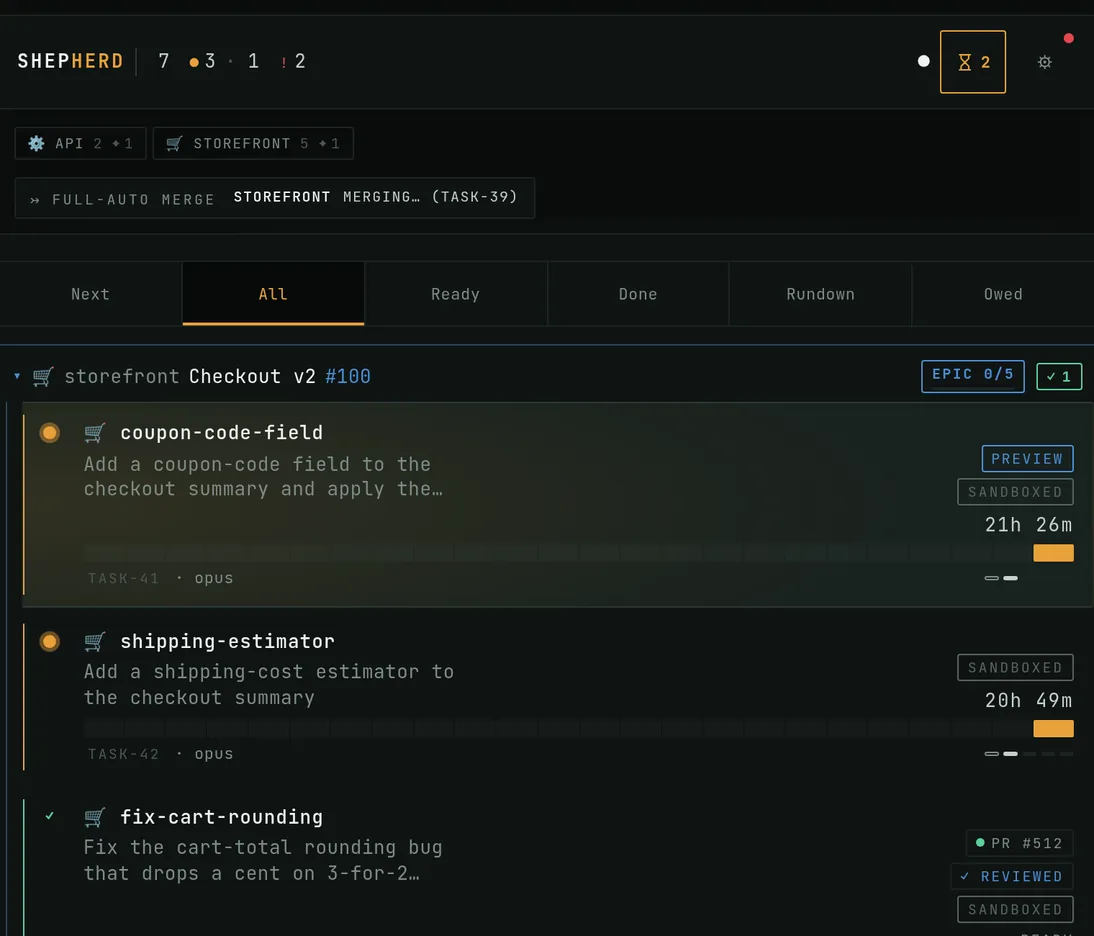
What's in the herd
Everything you operate the herd with
The review gates that keep its output shippable get their own section below.
Interactive agent control
Spawn, watch, and steer a herd of real agent sessions in isolated git worktrees, from your browser or phone.
Multi-CLI
Drive Claude Code today, with the Codex CLI in alpha — both as genuine interactive terminal sessions, never headless. A held task can hand off from one CLI to the other.
Your /commands come with you
Every slash command, skill, and plugin you use locally is available — each Claude session is a genuine interactive claude against your own ~/.claude. The cloud Claude Code can't carry that.
Readiness
Scores a JS/TS repo's guardrails — typecheck, lint, tests, CI, house rules — before you point agents at it, turning gaps into an install task.
Autopilot
Hand a task the whole loop: the agent plans, implements, opens a PR, addresses the critic's findings, and merges when it's ready — or completes research and issue-creation tasks that never produce a PR. Opt in per task, where you trust it.
Epics & sub-issues
Run an epic as many coordinated branches, backed by native GitHub sub-issues and grouped by epic. The landing PR auto-lands once every piece is green.
Visual plans & recaps
Plan-gate plans render as a scannable document — file trees, diagrams, data models — not a wall of text. When a session finishes, its recap does the same: a tree of what changed, the annotated diff, toned callouts, and Mermaid diagrams.
Dev-server preview
When a session starts a dev server, Shepherd serves it over Tailscale and drops a preview into the session — open the agent's running app from your phone, with no setup.
Usage-aware
Run many agents on one subscription without burning it. When usage is high a new task holds and starts on its own when usage resets — submit anyway to override — and a session halted at a limit resumes in one click. A usage dashboard, timeline heatmap, and trends show where the tokens go.
Command bar
Press ⌘K — or Ctrl+K on Windows and Linux, even while the terminal is focused — to open a quick-switcher. Type to filter across your sessions, repositories, and herd lenses, then hit Enter to jump straight there.
Ambient tab signal
Leave Shepherd in a background tab and it still tells you what the herd needs: the tab title counts the sessions waiting on you and the favicon takes on a severity color — red for failing CI, amber for blocked, green for ready to merge — with a progress ring for the session you are watching. Installed as an app, it updates the app badge too.
Server-side plugins
Extend the dashboard itself. Operator-installed, out-of-repo plugins run on your instance and render real panels, charts, and gear-menu actions in Settings — separate from the local slash commands, skills, and plugins that each agent session already carries.
How it works
From an issue to a reviewed merge
Point Shepherd at a repo and hand it a task. Here is the path every task travels — many at once, and every one built to stop before it does something you would want to see first.
- It starts as an issue.
- Its own worktree. Its own real terminal.
- A dozen of these at once.
- It writes a plan — and stops. A second agent tries to refute it.
- Then it works.
- CI. Hygiene. Then a third agent reads the diff.
- Only what survives lands.
- And when it can't, it stops and tells you why.
There is more once you are in — epics for work too big for one task, a short code when a task pauses and needs you, and repos wired to GitHub or kept entirely local. None of it is needed to start.
Live demo
See the herd run — no install
Open a fully interactive Shepherd dashboard right in your browser: spawn sessions, watch the herd, and click through every lens. It runs on a simulated backend — nothing here touches real infrastructure — so you can try the whole thing before you deploy anything.
Launch the live demoOpinionated by design
Running many agents is the easy half; keeping their output shippable is the actual product.
Shepherd institutionalizes the practices a careful team would otherwise enforce by hand, as per-repo automation — the discipline layer around the sessions, not just more panels.
- Plan gate
Every autonomous plan faces an adversarial read-only reviewer before any code is written.
- Critic
Every PR's full diff is reviewed the moment CI goes green; findings can flow back to the author automatically.
- Learnings
House rules distilled from past failures are injected into every new agent in the repo; ones that stop helping retire themselves, and recurring ones promote across repos.
- Merge train
Nothing lands while behind its base — a stale PR is sent back to its agent to rebase, and CI and the critic re-run first.
- Manual operator steps
Human-only steps a PR declares — env vars, migrations, DNS cutovers — are surfaced and hold auto-merge until they are acknowledged.
- Hygiene gates
CI and the pre-push hook enforce linear branches, locale-catalog parity, feature-catalog completeness, and a dead-code / complexity audit.
Update without the outage
Redeploy Shepherd mid-run. The herd never notices.
herdr durably owns the interactive agent PTYs; Shepherd is the control plane that bridges them to your browser. So you can pull, rebuild, and restart Shepherd while agents are mid-task — the dashboard reloads, the sessions keep running and reattach. Nothing lost, no run interrupted.
“The orchestrator is disposable. Your running agents are not.”
This split exists because of herdr, the agent multiplexer by Can Celik — without it, Shepherd wouldn't be possible.
herdr holds the sessions
The PTYs your agents run in live in herdr, not in Shepherd. A Shepherd restart never reaches into them — when the dashboard comes back, it just reattaches to the herd that kept running.
One click, in place
When new commits land on main, the in-app Update pulls, rebuilds, and restarts the service — detached, so the deploy survives its own restart and reports the result back. The page reloads on its own; your agents don't.
Not the cloud trade-off
Redeploying a hosted or SDK-driven orchestrator kills its in-flight work. Here the control plane and the work are separate processes, so shipping a Shepherd update costs you zero agent progress.
The defining constraint
It only drives real terminal sessions
Shepherd only drives genuine interactive terminal sessions — it never uses the Agent SDK or claude -p. It observes (reads the terminal and agent status) and steers (injects keystrokes into the live pane).
“If a feature can't be done by typing into a real terminal, it doesn't ship.”
Auth
Runs on your own Claude Max/Pro subscription — or opt intoAPI-key auth (footing B) in Settings → Session for a clearly-compliant metered path. Either way these are still genuine interactive sessions, never claude -p or the Agent SDK.
Needs
- Bun — backend runtime + package manager
- herdr on PATH — owns the interactive agent PTYs
- The claude CLI, logged in (the Codex CLI too, for the alpha path)
- Node.js — for the PTY helper subprocess
Self-hosted on your own server.
Operating systems
- LinuxFullsystemd + unprivileged userns — sandbox membrane, egress allowlist, auto-drain, tailscale-served dev-server previews, and the systemd unit.
- macOSCore-onlyInstalls and builds, but no sandbox, egress allowlist, auto-drain, dev-server previews, or systemd unit. Run bun run start manually.
- WindowsNot supportedThe installer refuses and routes you to WSL2.